

Download the app on your App store-search “Muskegon Federal Credit Union” to download
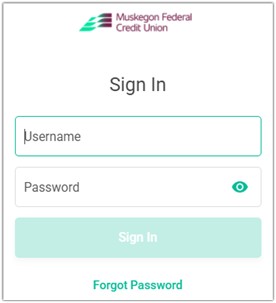
Logging in for the first time
- You must sign in within 24 hours or the password will expire
Username-base account number
Password-last four digits of primary owner’s social security number
- This is a temporary password
Set new password
Must have 3 out of the 4 requirements and be at least 6 characters long
You can always reset the password 2 ways
- Click forgot password at bottom of sign in page (you must know the answers to all 3 security questions)
- Call us to reset it
![Next, let's create your password. Your new password will be case sensitive, must be six through two hundred and fifty six characters long, and must pass three out of four of the rules outlined below: create a password one uppercase one lowercase one number one special character (excluding : ^ [] ") set a password](https://www.muskfedcu.com/wp-content/uploads/Picture2.jpg)
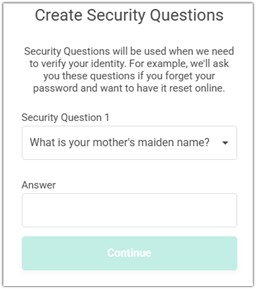
Set 3 security questions
MFCU does not have the answers to these; whatever is entered now, is what will be used the next time these are asked
If you want to choose a different question, touch the question and scroll to the one you want
- Call us to reset security questions
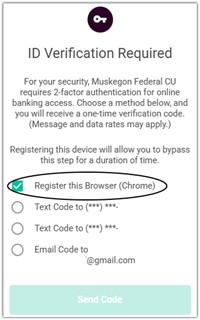
Verification code
- Select “register this device” and choose what number or email you want to receive the code, then wait for it
- Without closing out the app open text messages or email (whichever you chose)
- Copy down the code, then go back to MFCU app
ItsMe247 Text: Your verification code is XXXXXX. It will expire in 15 minutes. Do not share this with anyone; we’ll never ask you for it.
Just now
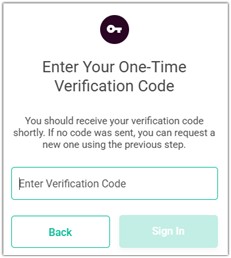
Type in the code and sign in
- It will not ask you again for 90 days if you clicked register this device previously
- Never give your code out to anyone-we will never ask you for your code
Things to look at in online banking:
- Remote Deposit Capture-deposit checks remotely
- E alerts-set alerts to text/email you for whatever you want (deposits, withdrawals, etc.)
- Bill Pay-set up automatic payments from your checking account
- Lock Debit/Atm card-toggle it off if you lost it or want to make sure nothing comes through (unlock card 10 minutes before using again)
- AFT-set up automatic transfers for future dates (great for loan/visa payments)
Any questions or need more help?
Please call us at 231-722-7285 or visit our website www.muskfedcu.com